

Nobody signs up for a step challenge because of the rulebook. But the rulebook is the whole difference between a challenge people actually enjoy and one that ends in an argument over whether someone really walked 58,000 steps at a wedding. Step challenge rules are the shared guidelines that define how a challenge is scored and won: who can join, how steps are counted and capped, how teams are scored, how non-walking activity converts to steps, and how winners and ties get decided. Sort them out before the start and the whole thing stays fair for every fitness level, with most of the temptation to cheat quietly designed out.
- Good rules are written before kickoff and shared with everyone, so nobody argues about the scoring after the fact.
- Scoring by average steps per member, not team total, keeps small and large teams on an even footing.
- A daily step cap plus auto-syncing devices removes the two easiest ways to cheat.
- Activity conversions for cycling, swimming, and wheelchair use let non-walkers compete fairly.
- Across 5,500+ organizations on Pacer, employees average 40% more steps after joining a challenge.
Most challenges go sideways in one of a few predictable ways. The same three people lap everyone else by week one. Someone posts 60,000 steps on a Tuesday and the group chat turns into a courtroom. A colleague who cannot walk realizes on day one that the whole thing was built without them in mind. Clear rules, written down before anyone starts, head off all of it. This guide covers how to write them, drawing on patterns from the 18,000+ challenges run across 5,500+ organizations on Pacer for Teams.
New to running one? The full setup is covered in our guide on how to run a workplace step challenge. This piece zooms in on the rules that keep it fair.

What Are Step Challenge Rules?
At work, a step challenge goes by a few names: an office step challenge, a corporate step challenge, a team step challenge, or a remote step challenge for distributed staff. The format changes with each one, but the need for clear rules does not.
A complete rule set answers a short list of questions before anyone takes a step. Who is eligible, and is joining voluntary? How are steps tracked and how often do they need to sync? Is there a cap on steps per day? How big are teams, and how is the score calculated? What happens with non-walking activity, and how are ties broken? When those answers are written down and shared, the challenge feels fair, and the organizer has a clear reference if a dispute comes up.
Rules also protect the health goal behind the whole thing. Walking is good for the heart and clears the head, so rules that reward turning up regularly, rather than just posting the biggest number, keep the challenge aimed at building a habit instead of crowning whoever was already the fittest.
What Makes a Step Challenge Fair?
A step challenge is fair when someone who is new to walking has a real shot at a win, and when nobody can top the leaderboard by gaming the system. Three design choices carry most of the weight.
The first is the scoring model. Ranking teams by average steps per member rather than by combined total means a team of six is not automatically beaten by a team of twelve. Everyone’s steps count the same, whatever the team size.
The second is the goal structure. A single “10,000 steps a day” target rewards people who already walk a lot and quietly discourages everyone else. A baseline goal plus a stretch goal gives every fitness level something to aim for, and a “most improved” award recognizes the person who went from 3,000 to 7,000 steps, not just the one who was already at 15,000.
The third is inclusion. Not everyone can walk, and not every job involves being on your feet. Publishing activity conversions, so that cycling, swimming, or wheelchair pushes count toward a step total, keeps the challenge open to people with different bodies and different routines. Fair rules treat inclusion as part of the design, not as an exception bolted on later.
How Do You Write Step Challenge Rules?
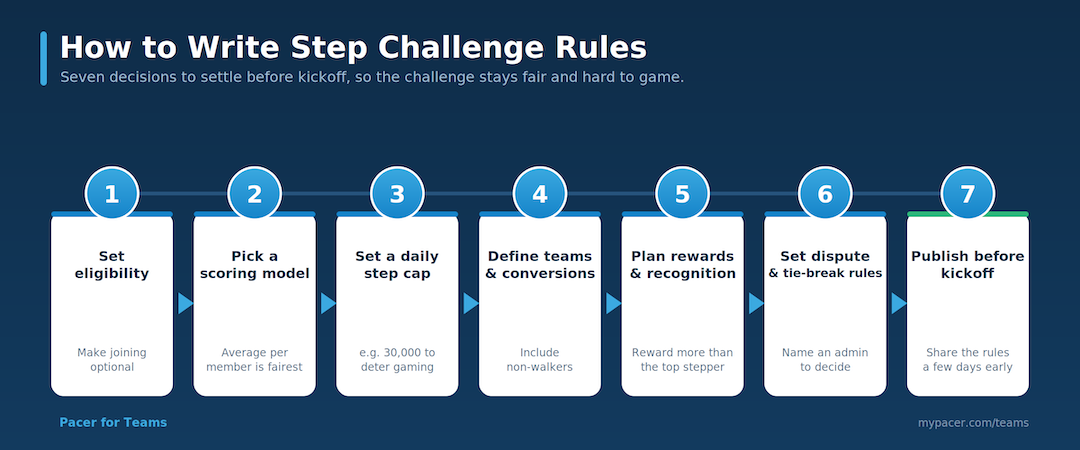
You can draft a solid rule set in an afternoon by working through seven decisions in order. Each one closes a gap where confusion or cheating usually creeps in.
1. Set eligibility and make it voluntary. Decide who can join, whether it is all staff or specific departments, and state clearly that taking part is optional. A challenge people opt into beats one they feel pushed into.
2. Pick a scoring model. Choose total steps, average steps per member, or most improved. Average per member is the fairest default for teams of different sizes. Write down exactly how the winner is calculated.
3. Set a daily step cap. Cap the steps that count in a single day, for example at 30,000. A cap deters the classic tricks like shaking a phone or strapping a tracker to a treadmill desk, without penalizing a genuinely active person.
4. Define teams and activity conversions. Set a team size that keeps things social but accountable, usually 5 to 10 people. Publish a conversion table so non-walking activity counts, such as 10 minutes of cycling equals 1,000 steps.
5. Decide rewards and recognition. Set your prizes and budget, then add awards that are not tied to raw step counts. Recognizing most improved, best team name, or perfect attendance keeps people who will not win on total steps engaged to the end.
6. Write the dispute and tie-breaker rules. Name one admin as the contact for questions and disputes, and state how ties are broken, for example by active days or GPS-verified distance. People accept a decision far more easily when the process was set out in advance.
7. Publish the rules before kickoff. Share the full rule set with everyone at least a few days before the start date. Rules that appear only after someone complains never feel fair.
How Do You Prevent Cheating in a Step Challenge?
You prevent most cheating by designing it out, then verifying the edge cases. Two rules do the heavy lifting: a daily step cap, and auto-syncing from a phone or wearable instead of manual entry. Manual entry is where inflated numbers come from, so removing it removes the temptation.
For the small number of scores that still look off, it helps to know what a suspicious pattern actually looks like. A day that sits far above a person’s own running average, a step count that does not match the GPS distance the app recorded, or a perfectly flat count with no natural ups and downs across the day are all signals worth a second look. Pacer for Teams leans on this kind of data verification and GPS-based tie-breaking, and the details of how organization challenges are ranked and how ties resolve live in the Pacer for Teams ranking and tie-breaking help article.
The point is not to turn the organizer into a detective. Most people never cheat, and the funniest attempts tend to be obvious anyway, as our roundup of step count cheating stories shows. A cap and auto-syncing, plus a clear rule that manual inflation and shared devices are not allowed, cover almost everything. Verification is there for the rare case the rules do not catch on their own.
What if Someone Is Wrongly Flagged?
Some people rack up huge step counts honestly. Nurses, delivery drivers, retail staff, and marathon runners can all post numbers that look impossible to a desk worker. A fair rule set assumes good faith first and gives these people a way to explain, rather than quietly removing them from the leaderboard.
Build a simple appeals path into your rules. State that a flagged score is reviewed, not automatically disqualified, and that the participant gets a chance to respond before anything changes. Keep the tone friendly, because most flags turn out to be legitimate. A short message does the job:
Hi [name], your steps on [date] came in higher than usual, so we are just double-checking before the leaderboard locks. Totally fine if it was a big walking day or a run. Could you reply and let us know what you were up to? Thanks for being part of it.
Handling it this way protects two things at once. It keeps genuine high steppers from feeling accused, and it keeps the leaderboard credible for everyone else. An organizer who removes a real result by mistake does more damage to trust than a single cheater ever could.
Which Scoring Model Is Fairest?
There is no single right model. The fairest choice depends on your team sizes and what you want to reward. Use this table to match a model to your situation before you commit.
| Scoring model | How it works | Fairest for | Watch-out |
|---|---|---|---|
| Total steps | Everyone’s steps add up; highest total wins | Solo challenges where everyone competes alone | Rewards people who already walk the most |
| Average per member | Team score is total steps divided by team size | Teams of uneven sizes | Needs a minimum activity rule so no-shows do not drag a team down |
| Most improved | Ranks by percentage gain over a personal baseline | Mixed fitness levels | Needs a clean baseline week before the challenge starts |
| Milestone or lottery | Anyone who hits a daily or weekly goal earns an entry to win | Big groups and pure participation goals | Less competitive, so pair it with a leaderboard for people who want one |
Many organizers run two of these at once, for example an average-per-member team race alongside a most-improved individual award. That way the competitive people and the casual walkers each have a way to win.
Common Step Challenge Rules Mistakes to Avoid
A few mistakes come up again and again. Each one is easy to avoid once you know to look for it.
- Winner-take-all prizes. A single big prize breeds suspicion and pushes people to cut corners. Spread rewards across categories and add a lottery tier.
- No daily step cap. Without a cap, one gamed day can decide the whole challenge. Set one before you start.
- Ignoring remote and cross-office fairness. Time zones and travel mean not everyone gets the same window. Score in a way that does not punish people for their schedule.
- No activity conversions. Leaving out cycling, swimming, and wheelchair use quietly excludes anyone who cannot rack up steps on foot.
- Publishing rules late. Rules that show up only after a complaint always feel unfair. Share them before kickoff.
- No dispute contact. With nobody named to handle questions, small disagreements turn into public arguments. Name an admin up front.
Frequently Asked Questions
What are the basic rules of a step challenge?
The basic rules cover who can join, how steps are tracked and how often they sync, whether there is a daily step cap, how teams are sized and scored, how non-walking activity converts to steps, and how winners and ties are decided. Agreeing these before the start keeps the challenge fair and clear.
How do you make a step challenge fair for all fitness levels?
Score by average steps per member instead of team total, offer a baseline goal plus a stretch goal, add a most-improved award, and publish activity conversions so cycling, swimming, and wheelchair use count. These choices give newcomers a real chance to win.
How do you stop people cheating in a step challenge?
Use auto-syncing devices instead of manual entry, set a daily step cap of around 30,000 steps, and state that manual inflation and shared devices are not allowed. For scores that still look off, review the pattern against the person’s own history and GPS data before acting.
What is a good daily step cap for a challenge?
A cap of around 30,000 steps a day works for most workplace challenges. It sits well above what an active person reaches on a busy day, so it never penalizes genuine effort, while still cutting off the inflated counts that come from gaming a tracker.
How are winners and ties decided in a step challenge?
Winners are decided by the scoring model you chose, most often the top average-per-member team plus a most-improved individual. Ties are usually broken by active days or by GPS-verified distance, and the tie-breaker should be written into the rules before the challenge starts.
Should a workplace step challenge be individual or team-based?
Team-based challenges tend to drive more engagement because teammates keep each other going, while individual challenges suit small groups or people who prefer to compete alone. Many organizers run both at once, with a team leaderboard and an individual most-improved award.
Conclusion
Fair rules are what turn a step challenge from a leaderboard a few people dominate into something the whole team actually enjoys. Decide your scoring, set a cap, publish activity conversions, and write down how disputes get handled, all before kickoff. Do that, and you spend the challenge cheering people on instead of refereeing it.
When you are ready to run one without the manual tracking, Pacer for Teams auto-syncs steps and builds the leaderboard for you, caps included, so the rules enforce themselves. For the full setup walkthrough, see our guide on how to run a workplace step challenge.

Leo Lei is a Marketing Specialist at Pacer, where he covers workplace wellness and walking challenges. He works with step data from thousands of companies on Pacer to write practical guides for HR and people teams running their own challenges.