

Be honest. The last "wellness initiative" email at your company was opened by four people, and two of them were on the wellness committee. Step challenges don't flop because walking is hard. They flop because the emails announcing them read like a software license agreement, and nobody laces up for a footnote.
So let's rescue yours. A step challenge announcement email is any message that tells employees a challenge is happening and nudges them to actually join, from the pre-launch teaser all the way to the winners reveal. Below are 8 you can copy, paste, and send, each with subject-line options and a schedule for when to fire it off. They're built on what genuinely gets people moving across the 18,000+ challenges run on Pacer for Teams.
- The winning sequence is 8 emails, not one heroic kickoff that everyone forgets by Tuesday.
- Send more than once. A single email is why most challenges fizzle out.
- Put the date or the prize in the subject line. "Q3 Wellness Update" has never once excited a human being.
- The mid-challenge nudge does the heavy lifting, because it catches the people who haven't quit but definitely forgot.
- Across 5,500+ organizations on Pacer, employees average 40% more steps after joining a challenge.

What Is a Step Challenge Announcement Email?
It's the whole sequence, not a single send. Across a typical 4-week challenge that's about 8 messages: the early teaser, the sign-up email, a launch-day kickoff, a couple of mid-challenge nudges, and the winners announcement. Skip the ones in the middle and participation quietly leaks away.
The 8 Step Challenge Announcement Email Templates
Copy these, fill in the brackets, and season to taste. Each one lists when to send it, a couple of subject-line options, and the body copy. Sending on Slack or Microsoft Teams instead of email? Same words, smaller paragraphs. Go for it.
1. The Teaser (Save the Date), 2 Weeks Before
Goal: build curiosity. Channel: email or Slack.
Subject line options:
- Something big steps off on [date] 👟
- [Company], clear your calendar (and maybe your sneakers)
Hi team,
Mark your calendar. On [date] we're kicking off the [Company] Step Challenge, a [4-week] friendly competition to see how far we can go together. Teams, a live leaderboard, and [prize] are all on the table.
No training plan, no wearable, no spandex required. If you own a phone and a pair of feet, you're qualified.
Sign-up details land next week. For now, just save the date.
[Organizer name]
2. The Sign-Up Email, 1 Week Before
Goal: get people registered before day one. Channel: email.
Subject line options:
- You're in: the [Company] Step Challenge starts [date]
- Join the [Company] Step Challenge in less time than this coffee break
Hi team,
It's official. The [Company] Step Challenge runs [start date] to [end date]. Here's how to get in before the first step counts:
1. Download [app] here: [link].
2. Join with team code [CODE], or pick your team here: [link].
3. That's it. Your steps start counting on [start date].
The format: teams of [5 to 10], a daily goal of [8,000] steps, and [prize] for the winners. Everyone's welcome, and your steps count exactly the same whether you run marathons or just walk to the fridge with conviction.
Questions? Reply here or ping [admin] in [channel].
[Organizer name]
3. The Launch-Day Kickoff, Day 1
Goal: turn sign-ups into active walkers. Channel: email, Slack, and a poster if you've got wall space.
Subject line options:
- It's on: the [Company] Step Challenge is live
- Your steps start counting right now
Today's the day. The [Company] Step Challenge is officially live.
Sync your steps today and you're in the race. The leaderboard updates all day, so you can watch your team climb (or plot your comeback) in real time.
Haven't joined yet? Two minutes fixes that: [how to join link].
Let's move. First standings drop tonight.
[Organizer name]
4. The First Leaderboard Update, End of Week 1
Goal: keep momentum with proof it's working. Channel: Slack.
Subject line options:
- Week 1 standings are in 🏆
- Somebody in [Team A] clearly isn't sitting down
One week down. Here's where things stand:
🥇 [Team A]: [X] steps
🥈 [Team B]: [X] steps
🥉 [Team C]: [X] steps
Most improved so far: [name]. Biggest single day: [name] at [X] steps, which we're choosing to believe was fully legitimate.
Three weeks left, and the gap up top is only [X] steps. Plenty of room to move up. Keep syncing daily so none of your hard-won steps ghost you.
[Organizer name]
5. The Halfway Push, Midpoint
Goal: re-engage the people who've drifted. Channel: email.
Subject line options:
- Halfway there, and it's still anyone's game
- Your team noticed you've gone quiet 👀
We're at the halfway mark of the [Company] Step Challenge, and the race is tighter than the elevator at 9am.
Fallen behind? This is your reset. One lunchtime walk can bump you up a spot. A few tricks from the people near the top:
• Take walking meetings when the agenda lets you.
• Park in the row of shame at the far end of the lot.
• A 15-minute stroll after dinner quietly adds around [1,500] steps.
Your team is counting on you. Two weeks to make them proud.
[Organizer name]
6. The Final-Week Sprint, Start of the Last Week
Goal: create urgency for the finish. Channel: Slack and email.
Subject line options:
- Final week: every step matters now
- This is where it's won or lost
We're into the final week of the [Company] Step Challenge, and the top [three] teams are separated by fewer than [X] steps. Translation: it's close enough to be decided by one enthusiastic dog walk.
Current standings: [link]. If your team is in striking distance, rally the group chat. If you're out front, no coasting.
Finish line: [end date] at [time]. Let's make it a strong one.
[Organizer name]
7. The Last-Day Countdown, Final Day
Goal: squeeze out the last steps and syncs. Channel: Slack.
Subject line options:
- Last call: steps stop counting tonight
- Your final chance to lap the marketing team
This is it. The [Company] Step Challenge closes tonight at [time]. Every step you log today still counts, so take the long way to literally everywhere.
One favor: make sure your app has synced before [time], because a step that didn't sync is a step that never happened.
Winners announced [date]. Thanks for moving with us all month. Now go get those last steps.
[Organizer name]
8. The Winners Announcement, 1 to 2 Days After
Goal: recognize everyone and tee up the next one. Channel: email.
Subject line options:
- 🏆 The results are in
- We counted every step, so here's who won
You did it. Over [X] weeks, [number] of you logged [N] steps together, roughly the distance from [fun comparison, e.g. the office to another city].
🥇 Winning team: [team]
🌟 Most improved: [name]
🔥 Top individual: [name] at [X] steps
Prizes: [how to claim]. And a real thank-you to everyone who showed up day after day, including the people who joined on the last morning and sprinted the whole way. That counts too.
Next challenge kicks off [date]. Stay warmed up.
[Organizer name]
Which Announcement Email to Send When
Eight touchpoints across the challenge, not one lonely blast. This schedule spaces them so people stay in the loop without muting your name.
| When to Send | Primary Goal | Channel | |
|---|---|---|---|
| 1. Teaser (save the date) | 2 weeks before | Awareness | Email or Slack |
| 2. Sign-up email | 1 week before | Registration | |
| 3. Launch-day kickoff | Day 1 | Activation | Email, Slack, poster |
| 4. First leaderboard update | End of week 1 | Momentum | Slack |
| 5. Halfway push | Midpoint | Re-engagement | |
| 6. Final-week sprint | Start of final week | Urgency | Slack and email |
| 7. Last-day countdown | Final day | Finish strong | Slack |
| 8. Winners announcement | 1 to 2 days after | Recognition |
For a 4-week challenge that's about two messages a week. If your team lives in Slack, keep the quick updates there and save email for the teaser, the sign-up, and the big finish.
How to Write a Step Challenge Announcement Email That Gets Opened
The templates are your shortcut. These six rules are why they work.
1. Lead with the date or the prize in the subject line. People decide to open in about one second, so put the good stuff first. "Starts Monday, [prize] on the line" beats "Join our wellness initiative" every time.
2. Ask for one thing. Each email should have a single obvious action, whether that's signing up, syncing today, or checking the standings. Two asks means zero clicks.
3. Keep it short. Under 150 words. A challenge email is a nudge, not a terms-of-service update, and nobody scrolls to page two of enthusiasm.
4. Make joining a two-minute job. Drop the link and the team code right there so nobody has to go spelunking through the intranet to find them.
5. Write to the middle of the pack. Most readers won't win, and they know it. Talk to them like their steps matter, because that's who keeps a challenge alive after week one.
6. Send on a schedule, not on a whim. Plan the whole sequence up front so the reminders actually go out. The magic is in the rhythm, not in one perfect email you agonized over.
Common Mistakes to Avoid
A great template can't save a shaky plan. These are the classic ways to talk yourself out of a full leaderboard.
- Sending one email and calling it a campaign. Announced once and never mentioned again, a challenge goes quiet by Wednesday of week two. The sequence is the whole trick.
- Writing a subject line that hides the point. "An exciting update from the wellness team" excites no one. Name the date, the prize, or the deadline instead.
- Making people hunt to join. If the sign-up link and team code aren't in the email, most folks won't go looking. Put them front and center.
- Vanishing in the middle. Interest dips hardest around the midpoint. A quick halfway nudge is what pulls the casual walkers back, so going quiet then wastes your best chance to re-engage them.
- Only cheering the front-runners. If every shout-out goes to the office ultramarathoner, everyone else quietly checks out. Celebrate most-improved and team milestones too.
- Forgetting the wrap-up. No winners email means no closure and no runway for the next one. It's the easiest goodwill you'll ever earn.
What You Need to Send These
- Email or Slack plus a spreadsheet: free, but you'll be hand-copying standings into every update until you resent the whole idea.
- A step-tracking app plus your own comms: better tracking, but you're still gluing the leaderboard to the messages yourself.
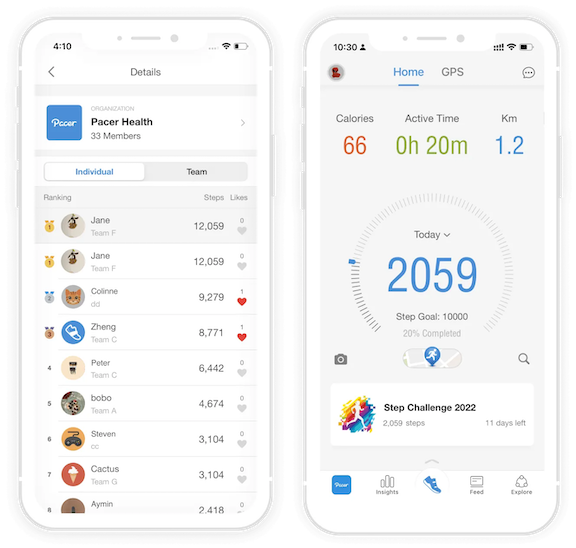
- A dedicated platform: automatic sync, a live leaderboard, and built-in reminders, so the updates basically write themselves.
If rebuilding a spreadsheet every night sounds like a punishment, workplace step challenge software like Pacer for Teams handles the sync, the real-time standings, and the reminder nudges for you. You bring the personality; it brings the numbers.

Frequently Asked Questions
What should a step challenge announcement email include?
A launch announcement should include the challenge name, the start and end dates, how to join in two minutes (a link and a team code), the daily or team goal, and the prize. Lead with the date or reward in the subject line, and keep the body under about 150 words with one clear call to action.
When should you send the step challenge launch email?
Send the main sign-up email about one week before the start date, then a shorter launch-day email on day one. The week of lead time lets people download the app and join a team, while the day-one note turns sign-ups into active walkers. A save-the-date teaser two weeks out helps build early buzz.
How many emails should you send during a step challenge?
Plan for about 8 touchpoints across a 4-week challenge: a teaser, a sign-up email, a launch-day kickoff, a first-week leaderboard update, a halfway push, a final-week reminder, a last-day countdown, and a winners announcement. That's roughly two a week, enough to stay visible without becoming the person everyone mutes. Sending just one is the most common reason participation fades.
What makes a good subject line for a step challenge email?
A good subject line names something concrete: the date the challenge starts, the prize on offer, or the deadline to act. "The [Company] Step Challenge starts Monday" outperforms a vague line like "Join our wellness program." Short subject lines with a little personality and one emoji tend to win the inbox.
How do you announce a step challenge on Slack or Microsoft Teams?
Post the same copy you'd email, just shorter and more casual, and pin it to a dedicated challenge channel. Slack and Microsoft Teams are perfect for the frequent, lightweight updates like leaderboard standings and mid-challenge nudges, while email works best for the teaser, the sign-up details, and the final results.
How do you re-engage employees who fall behind mid-challenge?
Send a halfway-point email that reminds people the race is still open and offers quick, low-effort ways to catch up, like walking meetings or a short evening stroll. Recognition helps most in the middle of the pack, so highlight most-improved walkers and team milestones, not just the leaders.
Conclusion
A step challenge is only as good as the emails carrying it. Plan the whole sequence up front and keep the energy up through the quiet middle, where most challenges quietly die. Do that, and a sleepy sign-up sheet becomes a challenge people finish and then ask to repeat.
If you'd rather not assemble the tracking, the leaderboards, and the reminders by hand, workplace step challenge software like Pacer for Teams runs all of it in one place, so your emails always have fresh numbers to brag about. Still shaping the challenge itself? Start with our guide on how to run a workplace step challenge, or wander into the wider world of the step challenge.

Leo Lei is a Marketing Specialist at Pacer, where he covers workplace wellness and walking challenges. He works with step data from thousands of companies on Pacer to write practical guides for HR and people teams running their own challenges.