


 Pacer Walking App
The #1 Walking App
Pacer Walking App
The #1 Walking App
 Scan with your phone
 to download App
Recording your steps is important when you track your daily activity levels. It is also the key measurement when taking part in a step challenge. However, what should you do if you forget to take your tracking devices with you or complete a workout that the device doesn’t recognize?
Here is a step conversion chart for you to convert activity to steps. You can use the estimated steps in your challenge if the challenge rules accept your manually recorded data.
Step Conversion Chart
To convert your activity to steps, simply multiply the number of minutes you’ve spent on the activity by the corresponding number of steps shown in the chart below.
*All conversions are estimates.
| Activity Type | Step/minute |
| Aerobic | 186 |
| Badminton (casual) | 162 |
| Badminton (competitive) | 181 |
| Basketball | 176 |
| Bicycling(general) | 186 |
| Bicycling(vigorous) | 214 |
| Bowling | 95 |
| Boxing (non-competitive) | 162 |
| Boxing (competitive) | 248 |
| Canoeing | 119 |
| Climbing (rock/mountain) | 190 |
| Dancing | 152 |
| Elliptical | 214 |
| Fencing | 167 |
| Fishing | 119 |
| Football | 190 |
| Frisbee | 95 |
| Gardening | 110 |
| Golf (carrying clubs) | 148 |
| Golf (powered cart) | 119 |
| Grocery shopping | 62 |
| Gymnastics | 133 |
| Handball | 238 |
| Hiking | 167 |
| Horseback Riding | 162 |
| Housework | 86 |
| Ice Skating | 181 |
| Jogging(general) | 190 |
| Judo | 219 |
| Jumping Rope (slow pace) | 200 |
| Jumping Rope (moderate pace) | 238 |
| Jumping Rope (fast pace) | 243 |
| Kayaking | 157 |
| Kickball | 181 |
| Kick boxing | 219 |
| Mopping | 119 |
| Mowing Lawn | 162 |
| Punching Bag | 162 |
| Rowing | 181 |
| Running(general) | 224 |
| Running(vigorous) | 286 |
| Shopping | 62 |
| Skiing | 181 |
| Snowboarding | 162 |
| Soccer (casual) | 181 |
| Soccer (competitive) | 214 |
| Sports(general) | 181 |
| Sports(vigorous) | 238 |
| Stair Climbing (machine) | 200 |
| Stair Climbing (slow pace) | 143 |
| Stair Climbing (fast pace) | 190 |
| Surfing | 95 |
| Swimming(general) | 167 |
| Swimming(vigorous) | 229 |
| Table Tennis | 143 |
| Tae Kwon Do | 219 |
| Tennis | 186 |
| Vacuuming | 110 |
| Volleyball (non-competitive) | 95 |
| Volleyball (competitive) | 167 |
| Walking(leisurely) | 81 |
| Walking(brisk) | 129 |
| Walking(very brisk) | 167 |
| Washing a Car | 48 |
| Water aerobics | 162 |
| Weight Lifting | 167 |
| Wrestling | 167 |
| Wheelchair | 143 |
| Yoga | 71 |
Convert Activity to Steps on the Pacer app
Pacer is a step challenge app for individuals and groups. Pacer automatically tracks your steps 24/7 and also integrates with the most popular wearables & providers. Aside from activities recorded and synced by smartphones or wearables, you can manually record step-based and non-step-based activities to your Pacer account. This also helps if you forgot a recording device but know your activity type and time duration.
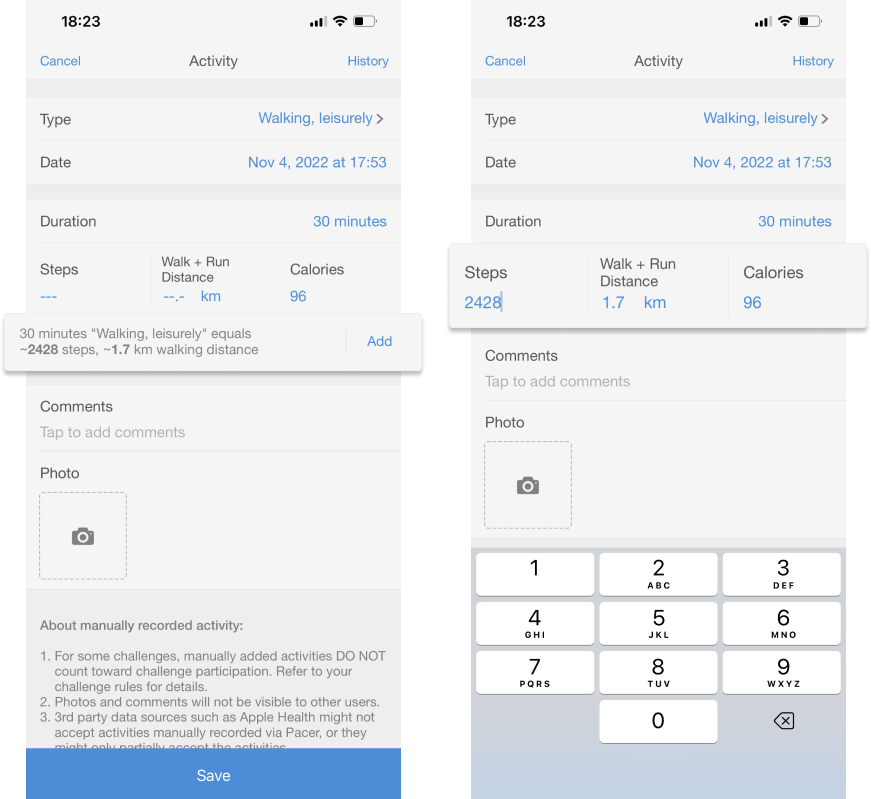
When you manually log your activity data on the Pacer app, Pacer will automatically calculate the converted data based on your activity type and time. You can use the suggested value directly or adjust it to the value you expect. Logged steps will be reflected in your step challenge if it accepts manually input data.
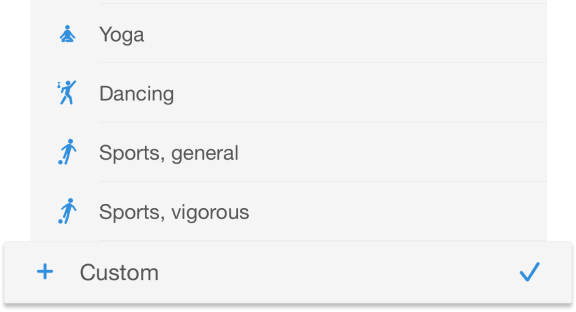
Select Custom if you cannot find your activity type on the app, use the step conversion chart above to calculate the estimated steps and log them.
Best Practices of Step Converter
Here are some ideas on how to use the step converter best to avoid duplicate counting, overcounting, and other issues. Following these tips to keep people on a level playing field during a corporate step challenge.
- Stick with one single data source during each workout
When you wear a tracking device, accurate step counts can be obtained from several activities, including aerobics, running, jogging, walking, and hiking. Do not manually log your activity using the converter while wearing a tracking device, your data will be counted twice, which will mess up your actual step count.
- Pay attention to your workout duration
The converter is based on the activity type and duration. For example, if you are swimming, choose the activity type and input the time you are in the pool, not the entire day. Similarly, if you’re in a climbing gym, only log the time you spend on the wall.
- Conversions are estimates
The conversions are estimated and should be used as a guide only. The conversion accuracy depends on many factors including the activity and the individual.
No need to worry about losing steps in your step challenge, get moving and know that Pacer for Teams is here to support you!
Create a fun step challenge for your company and inspire everyone to become more active!
Download our step conversion chart in .pdf version.